| |
| Current Topic: Technology |
|
Beagle - Desktop search for Linux |
|
|
|---|
| Topic: Technology |
1:09 pm EST, Jan 28, 2007 |
Beagle is a search system for Linux and other modern, Unix-like systems, enabling the user to search documents, chat logs, email and contact lists in a similar way to Spotlight in Mac OS X, or Google Desktop under Microsoft Windows. Beagle grew out of Dashboard, an early Mono based application for watching for and presenting useful information from your computer. It is written in C# using Mono and uses a port of Lucene to C# called Lucene.Net as its indexer. Beagle includes a Gtk#-based user interface, and integrates with Galago for presence information.
Beagle is freaking awesome! Use it, use it now. Beagle - Desktop search for Linux |
|
A Cost Analysis of Windows Vista Content Protection |
|
|
|---|
| Topic: Technology |
9:08 am EST, Jan 26, 2007 |
This document looks purely at the cost of the technical portions of Vista's content protection [Note B]. The political issues (under the heading of DRM) have been examined in exhaustive detail elsewhere and won't be commented on further, unless it's relevant to the cost analysis. However, one important point that must be kept in mind when reading this document is that in order to work, Vista's content protection must be able to violate the laws of physics, something that's unlikely to happen no matter how much the content industry wishes that it were possible [Note C].
Nicely put together article that avoids preaching most of the dogma around DRM. A Cost Analysis of Windows Vista Content Protection |
|
Viewing nearby rows - Greg's Postgres stuff |
|
|
|---|
| Topic: Technology |
3:40 am EST, Jan 24, 2007 |
I was given an OID number, and wanted to see which relation it mapped to, as well as what its "neighbors" looked like:
Look at this later. See if it's possible to grab the surround row's oids when my ORDER BY clause is not operating on oid. Viewing nearby rows - Greg's Postgres stuff |
|
Interview with Bill Cheswick |
|
|
|---|
| Topic: Technology |
11:36 am EST, Jan 22, 2007 |
The Internet runs on two fragile technologies: BGP connections among routers, and a bunch of root DNS servers deployed around the planet. How much longer do you think this setup could still be effective? Bill Cheswick: For quite a while, actually, though there are obvious, well-known weaknesses with both systems. The DNS root servers appear to be 13 hosts, but are actually many more. They have been under varying, continual, low-level attacks for many years, a process that tends to toughen the defenses and make them quite robust. A few years ago there was a strong attack on the root servers, taking 9 of the 13 down at some point. There are other root servers, of course. Anyone can run one, it is just a question of getting people to use it. I understand that China is proceeding with root servers of their own. DNSSEC is a way to get the right DNS answer, but its deployment has had problems for at least 10 years. BGP is certainly another network issue. Where should my routers forward packets to? BGP distributes this information throughout the Internet. There are two problems here: 1) is the distribution working correctly, and 2) are the other players sending the correct information in the first place. This is usually an easy problem between an ISP and their customer. The customer is only allowed to announce certain routes, and the ISP filters these announcements to enforce the restriction. It is easy on a short list of announcements. But at the peering point with other ISPs, this becomes hard, because there are hundreds of thousands of routes, and it isn't clear which is which. Should I forward packets for Estonia to router A or router B? We are far removed from the places where these answers are known.
Nice interview with Bill Cheswick, Firewall god, on Security Focus Interview with Bill Cheswick |
|
|
|---|
| Topic: Technology |
3:36 am EST, Jan 21, 2007 |
The Advanced Technical Support Team has reviewed the escalation regarding your IP unblock request for 66.109.98.18. We have examined this issue and determined that this IP address is not currently eligible for unblocking. When we examined this IP address we found that it identifies itself as s5.lookwhois.com. However, s5.lookwhois.com does not resolve back to the server IP address. Because we cannot verify the identity of this server we cannot unblock the IP address. Once this is corrected, please contact us so that we can re-examine the request.
ok, either someone from my hosting provider for Most Significant Bit Labs or someone at GoDaddy is going to get punched in the fucking face. |
|
AOL Phisher convicted possible 101 years in jail |
|
|
|---|
| Topic: Technology |
1:27 am EST, Jan 19, 2007 |
Want to be looked after the rest of your life in the company of big Otis, who likes to take showers? Then do what Jeffrey Brett Goodin did and become a criminal phisherman - now taken down by the US Department of Justice. The US Department of Justice has reported that in verdicts reached late Friday, Jeffrey Brett Goodin, 45, was found guilty of operating a sophisticated phishing scheme targeted at AOL users. He was convicted under the CAN-SPAM Act of 2003 of sending thousands of emails to AOL users that appeared to be from AOL's billing department and prompted the customers to send personal and credit card information, which he used to make unauthorized purchases. According to the US DOJ’s press release, the jury found that Goodin operated an Internet-based scheme designed to obtain personal and credit card information by tricking people into believing that they were providing information to a legitimate business.
Its nice to see CAN-SPAM being used to go after Phishers. I'm just amused as hell that phishing AOL users is still so profitable. I gave a presentation on this stuff once, and AOL has been fertile ground for over a decade now. I have many fond memories of phishing logins/passwords from first time AOL members in the "New User Lobby" back in mid 90s. AOL Phisher convicted possible 101 years in jail |
|
|
|---|
| Topic: Technology |
10:27 am EST, Jan 17, 2007 |
Catonic wrote: dc0de wrote:
I'm always amazed that with new programming languages, techniques, and plug-ins, that we continue to ignore the basic tenants of security, which is to "expect your application/code to be attacked." I can't wait until the "next new thing" and then the "shock / horror" that it too can be attacked... unless the programmers learn to actually think like an attacker.
The more time I see pass, the more I see this cycle repeat. It almost seems as if the software companies are actively trying to keep other companies in business... job security. -- Catonic
Decius has some good thoughts on this. Look at TCP/IP vulns. the Vista beta suffered from IP fragmentation attacks which hasn't been seen working in the wild since the Windows 95 days. The reason is simple: the programmers who solved those problems in Windows 95 are not the programmers who implemented the TCP/IP stack in Vista. Microsoft's mistake is even more retarded because the security issues with TCP/IP (Server state in the 3 way handshake, etc) and their solutions (SYN cookies, etc) are well known and studied area. What was the lesson of the SYN floods of the mid 90s? Don't allow a single unauthenticated packet to cause state to be stored on the server or cause several packets to be sent by the server to an unverified address. Which class of protocols totally forgot this piece of knowledge? Begins with V and ends in OIP. Security researcher Yoda says: Ignorance is the path to the dark side. Ignorance leads to poor choices. Poor choices leads to vulnerabilities. Vulnerabilities lead to IT suffering. Cyle of pain |
|
|
|---|
| Topic: Technology |
10:11 am EST, Jan 17, 2007 |
Security OPUS is an annual meeting of professional security researchers and information security practioners. The conference is a single track series of presentations designed to focus on new research/advances in the field. We are looking to ensure each talk contains relevant and current research and/or addresses today's issues. One-hour and extended presentation sessions provide attendees with a significant advantage, by being informed about current and future challenges.
SecurityOpus is a smaller conference with excellent speakers and a constructive atmosphere. The organizers do one of the best jobs I've seen at keeping the con running smoothly and the attendees happy. In short, more conference need to be like SecurityOpus, and I thank Richard for doing such an awesome job. The CFP is still open and I encourage the many west coast hackers on Memestreams to submit (I'm looking at you Mike!). Also, anyone in the bay area should look into attending. It’s held at the W Hotel in download SF across from the Moscone center. All meals are provided, with hor dourves and cocktails in the evening. You can register online as well. Security Opus 2007- CFP |
|
|
|---|
| Topic: Technology |
2:03 pm EST, Jan 16, 2007 |
Brilliant! We thought it sure would be handy if life came with status codes, but since it doesn't, we did the next best thing and printed them on stuff you wear. But not just any old stuff - we had to try something different, and print them on undies. So we bring you HTTPanties for the discriminating woman who would prefer a web-savvy and somewhat-direct approach in the romance department. Feeling frisky? Well then don the black "200 OK" panties and see where they take you. Alternatively, the white "403 Forbidden" style sends a very different and hopefully clear message. New for 2005 we bring you two more styles: 411 Length Required and 413 Requested Entity Too Large.
And now, in what will surely drive a "Not Safe For Work" flag, your moment of zen.
As some of my co-workers noted, there are many more HTTP code that could be pantified: 300 Multiple Choices
305 Use Proxy
402 Payment Required
406 Not Acceptable
415 Unsupported Media Type
417 Expectation Failed
501 Not Implemented
502 Bad Gateway ThinkGeek :: HTTPanties |
|
Your Free MacWorld Expo Platinum Pass |
|
|
|---|
| Topic: Technology |
12:58 pm EST, Jan 16, 2007 |
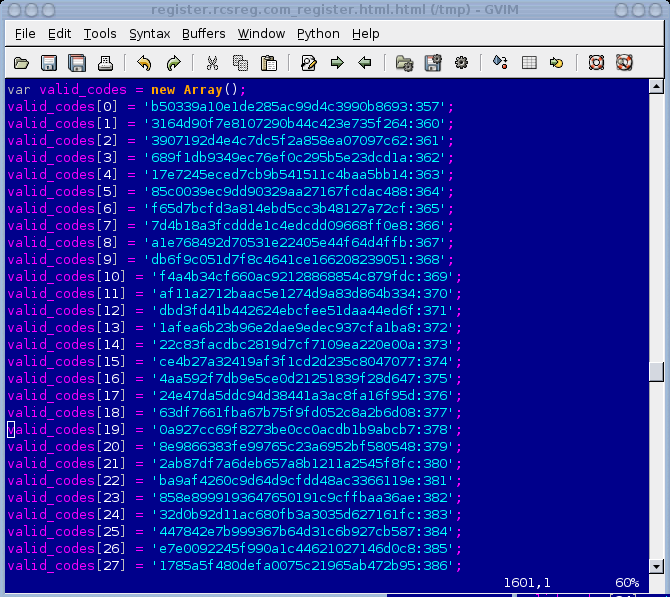
Last week a reporter asked me to comment on a story he was writing that detailed this hack. I couldn't post this to Memestreams until after that article was published. I plug in the register URL and start inserting my information. The second screen is where your Priority Code gets entered. Being the curious person I am I took a peek at the source code. Much to my chagrin I find this:
Well huh. These look like MD5 hashes. So what we need to do is crack the MD5 passwords with what we know about our keyspace: All upper case, most likely keyboard ASCII characters and numbers only. We can probably rule out non-printable ASCII so now we're just looking at A-Z0-9. Just an educated guess. We begin the crack. Less than 10 seconds and I've already cracked a code that looks interesting. Lets see what we get: A Platinum Pass for $0.00? Special line access to the Keynote! Alright!
My thoughts are this is an excellent example of security issues with Web 2.0 applications. Specifically, the leaking of an application's programing logic to the attacker. In the case, IDG tried to make their website more responsive by performing some of their validation on the client. They did this by pushing some JavaScript to the client's web browser. Even if IDG still performed that validation on the server, they have leaked how the priority code is verified and used by their website. This is the leaking of control logic All an attacker needs to do is look at the JavaScript code and see how the priority code is verified against a list of valid codes. Even though those codes are encrypted, the JavaScript again aids the attacker. It provides step by step instructions showing how the priority code is encrypted as well as the algorithm used allowing the attacker to easily brute force the valid codes. By accessing the JavaScript code, the attacker could also see that IDG made some mistakes before they encrypted the code, making the discounts even easily to brute force (IDG first capitalized the code and the removed a number of special characters and symbols, etc). This drastically reduced the number of combinations an attacker needs to try to brute force all the priority codes) Once the attacker knows all the priority codes, it is obvious which ones gave the attacker a free pass worth thousands of dollars. The moral of the story: JavaScript code is visible to an attacker. It is impossible to completely obfuscate or hide it. More and more Web 2.0 technologies like Ajax means more and more programs are placing application logic in JavaScript, making it even easy to attackers to find flaws in web applications. In this case, by trying to enrich the user's experience, the programmers exposed all of there discount offers in JavaScript, allowing an attacker to discovery them and perform fraud for thousands of dollars. Web developer's need to make sure they don't leak vital information about how their applications work. In today's Web 2.0 world of rich web interfaces like Ajax and Adobe's Flex, this is a very easy mistake to make. Your Free MacWorld Expo Platinum Pass |
|